C
Conditioning
Focus app for iPhone

Block Reddit until
you read for 15 minutes

Stop losing hours to mindless scrolling — Conditioning lets you block apps until you finish a goal, helping build better habits with a gentle nudge.

Download on the App Store iPhone · iOS 26+
3 months free, then $3.99/year
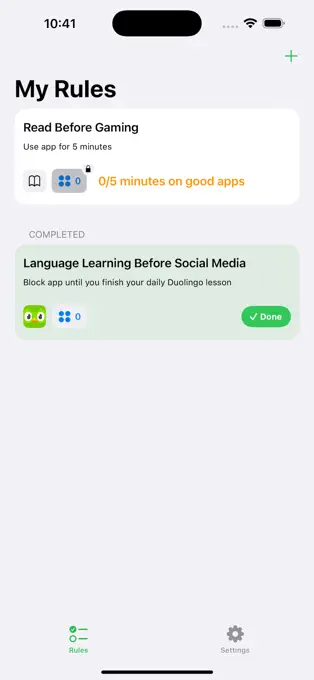
Conditioning — My Rules screen
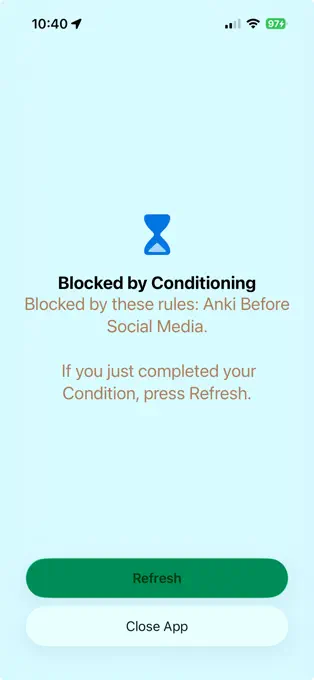
Conditioning — Blocked screen

You’ve probably already tried this.

I spent a long time trying to use iOS Screen Time limits – this blocks apps, but lets you through if you press a “15 more minutes” button. I pressed that button every single time for months.

Then I used One Sec, which makes you sit through a five or ten second pause before the app opens. I sat through the pause, then opened the app.

Both of these work exactly as designed — they add a speed bump before opening the app. Neither solution worked on the reflex itself — I felt bored, or grumpy, or tired, and there was a button on my phone that would help numb those feelings.

What finally worked was a rule that gave the reflex another outlet: fifteen minutes of reading before Reddit or Twitter. After a few weeks, “I’m bored” stopped meaning “open Twitter” and started meaning “read a couple pages of a book on Kindle.” Eventually, my desire to open Reddit or Twitter faded away.

I’ve saved hundreds of hours with this – at my worst I was on Twitter 4 hours a day, and now I barely open it at all. I’ve used the extra time to read, catch up with friends, and build projects like Conditioning.
Takes about a minute.

  1. Grant Screen Time permission. Tap a button and scan for Face ID.
  2. Pick the app to block: search, tap, confirm.
  3. Pick the condition to unlock — a Duolingo lesson, or time spent in an app that’s better for you.

And you’re done! If you’ve got quick fingers you can do this in under a minute.

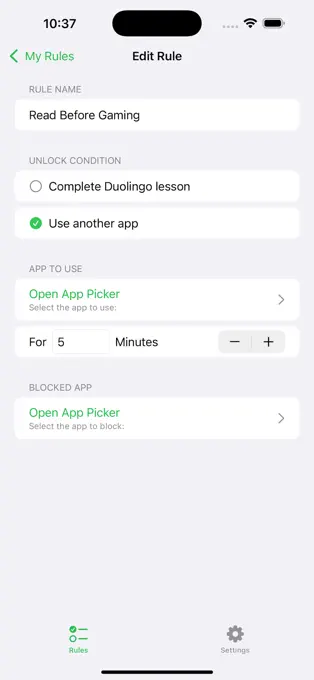
Conditioning — Edit Rule screen
My Rules screen

Every rule you’ve set, and how far along you are on each one.

Edit Rule screen

You choose the app and you choose the condition. You can change either one whenever you want.

Blocked by Conditioning screen

What you see when you reach for the app before you’ve done the thing.

I take privacy seriously.

You’re trusting me with your screen time data. Apple does protect your data — Conditioning only sees a random token instead of any app names — but on top of that, I promise that all rules and Screen Time data stay on your device.

What I do collect is anonymous usage data — data like “stopped at step 2 of the tutorial” or “app crashed when opening Settings”. It doesn’t include any of the apps you use or rules you’ve set up. I use this to fix bugs and figure out what to build next.

I can promise to protect your data and tell you privacy is important to me, but ultimately you’ve gotta trust me. I’ve got my name and reputation attached to Conditioning, and you can reach me at hello@conditioning.app.

Lock in $3.99 / year, keep it forever.

Three month free trial up front, to find out if it’s right for you.

The price will go up as I add more features and make the app better. But whatever price subscription you start paying for, you get to keep as long as you stay subscribed. I’m charging what the app is worth today, and it’s my way of thanking you for early support.

There’s no free tier, no ads, and I’ll never sell out to Bending Spoons. I’m providing a useful app and you pay me a few dollars a year for it.

Elliot Fiske

I made this for myself first.

I knew I had to do something when my Screen Time report said “4 hours a day on Twitter.” I couldn’t even remember what I had done on Twitter, but definitely could feel that it made my mood worse.

I write iOS apps for a living. I saw that Apple had released a new “Screen Time API”, and their example app looked really useful – blocking distracting apps on a kid’s phone until they completed some time on an educational app. Nobody else had built it yet, so I did.

I’ve been using Conditioning for a year now. My Twitter and Reddit usage is now basically 0, freeing up my brain for more important and satisfying things, such as shipping my own iOS app 😊

— Elliot Fiske · hello@conditioning.app

It doesn’t work on everybody.

I’ve tested this app with my friends – some of them try it for a week then bounce off.

This app works best if you’re motivated by simple, achievable goals, and you just need a “nudge” in the right direction. Try imagining opening Instagram and seeing a screen that says 0/5 minutes spent reading – if that would motivate you to instead open up Kindle and read a few pages, this app would be a good fit. If you think you would just go and turn off the rule instead, probably not.

If this doesn’t sound like something that would be useful to you, here are other options I recommend:

  • Jomo — Similar to my app, plus extra rule types and a dashboard for your screen time. It’s $6/month, which I still pay for today.
  • One Sec — One of the first screen time apps I tried. Makes you pause and do a breathing exercise for 10 seconds before opening bad apps, with other configurable interruptors.
  • Cold Turkey — if you really want a hard block, this program ties into your operating system and makes it impossible to use the bad apps.

Start building better habits.

Three months free, then $3.99 a year. A minute to set up – if you don’t like it, cancel the trial and keep using it the rest of the 3 months. If it clicks, it could change your life.

What do you think you could do with the hours you’re currently wasting on attention-parasite apps?

Download on the App Store